
Grab your coffee.
Your Mac is guarded.
Step away from your laptop in public without packing up your whole setup. If someone unplugs your charger, closes the lid, or looks at your screen, WFCop sounds an instant siren and snaps their photo.
Instant setup • macOS 13.0+ (Ventura, Sonoma, Sequoia) • 100% Free & Open Source
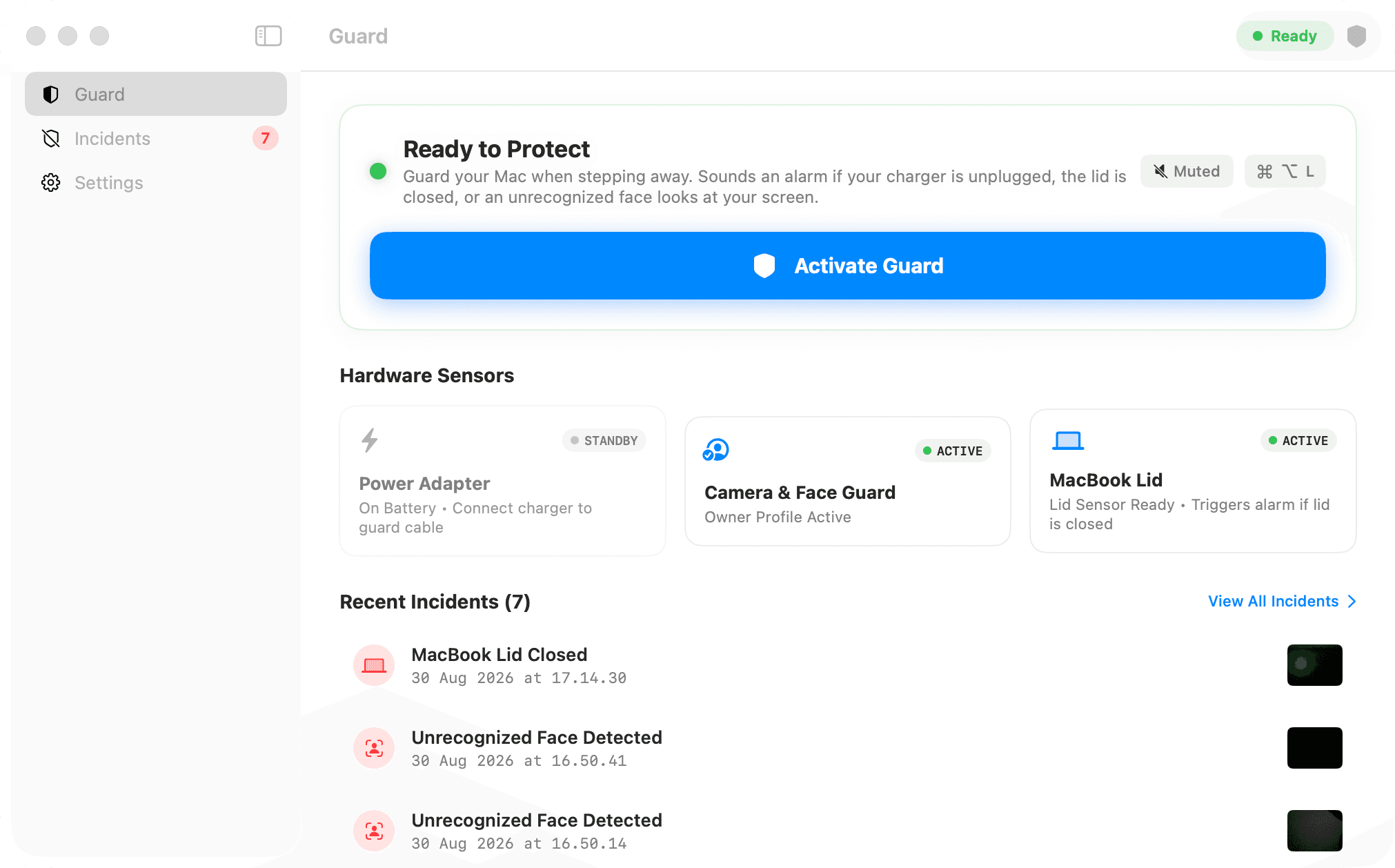
One click before you step away. Disarm instantly with Touch ID when you return.
Three physical triggers
thieves can't bypass.
WFCop guards against the exact physical actions someone takes when trying to snatch or snoop on your laptop.
Unplug the charger?
Instant siren.
The moment someone disconnects your MagSafe or USB-C cable to grab your Mac and run, an alarm triggers in milliseconds.
Close the lid?
Alarm still blares.
Think closing the display silences the alarm? WFCop keeps the siren screaming at maximum volume even with your MacBook snapped shut.
Stranger peeking?
Photo captured.
Your Mac quietly watches for unfamiliar faces. If someone leans in to read your screen or type on your keyboard, their photo is snapped instantly.
100% Volume Override — Even if your Mac was on mute.
When triggered, WFCop instantly unmutes and blasts an attention-grabbing alarm through your built-in speakers so everyone in the cafe turns around.
Your physical security.
100% of your privacy.
No accounts to create. No monthly subscriptions. No cloud servers watching your screen.
Zero Internet Connections
WFCop holds zero network permissions. It cannot open web connections, send tracking analytics, or transmit user data anywhere.
Photos Stay on Your Mac
Captured photos of intruders and incident logs are saved directly to your local drive. Nothing ever touches a cloud server.
On-Device Face Matching
Face comparison runs locally on the Apple Neural Engine. Your biometric face profile is never shared or exported.
Works 100% Offline
All alarms, sensors, and kiosk protections operate flawlessly without Wi-Fi, mobile hotspot, or internet access.
Ready to work anywhere
without anxiety?
Download the free macOS installer and secure your laptop in under a minute.
WFCop for macOS
Free & Open Sourcev1.0.0Universal Binary • Notarized by Apple • Zero Subscriptions
Easy 3-Step Setup
Download Installer
Download the official notarized package directly from GitHub Releases.
Drag to Applications
Open the disk image and drag the WFCop icon straight into Applications.
Ready to Guard
Launch WFCop, calibrate your face profile, and enjoy worry-free cafe work.